Issue
The Microsoft 365 Copilot app installs in the background on Windows devices that already have Microsoft 365, in Canada too. Council usually does not vote on it.
Source: Microsoft Learn, "Deployment overview for the Microsoft 365 Copilot app," last updated January 20, 2026, cited in the LUMINARYX™ briefing The quiet AI rollout in Canadian municipal software, April 2026.
Every step goes on an audit trail the database refuses to edit. The red button simulates someone getting around that and changing an old entry.
Each entry includes the fingerprint of the entry before it.
Background
A 2026 national survey of 292 local government leaders found:
| 55% | of local governments now approve Microsoft Copilot for use |
| 34% | have given employees no guidance on how and when to use AI tools |
| 42% | provide no training or resources to help employees use AI |
| 54% | name lack of expertise as their top challenge in putting AI to use |
Source: MNP, 2026 Municipal Report key findings, May 29, 2026, and MNP, Closing the AI gap, July 27, 2026. Survey conducted with Leger, January 21 to February 12, 2026.
Discussion
How it works
- For each decision area you set a suggested approver, how many approvals, whether the CAO signs last, and one or two human reviews of the AI output.
- Any staff member can start a decision. On submitting it, they pick the approvers and become its owner.
- Nobody approves their own decision. High risk needs two senior approvers (CAO or department head); a manager cannot approve it. Critical cannot be approved in the system: the CAO is alerted and the outcome is recorded.
- The rules-based assessment checks the decision against your policies and Canadian law. After approval, the owner attaches a sample of the AI tool's output (required at Medium and High) and chooses reviewers.
- When the reviews are in, the decision is complete and the CAO activates it.
How much each person does
Approvers and reviewers each do one short step, from an email link sent when it is their turn.
| The owner | Starts from one of 29 templates, which fill in most of the form, and picks approvers. After approval, attaches an output sample and chooses reviewers. |
|---|---|
| Each approver | Writes a reason and approves or returns it. |
| Each reviewer | Checks the output sample and records any concerns. |
| The CAO | Activates the completed decision. |
Templates: 13 where AI informs, 15 where it suggests, 1 where it drives the decision. You can add your own.
When the same work runs again
A repeat run of the same tool needs no new approval. Only the new output is reviewed: a reviewer marks it fine, flagged or rejected, with a comment. The risk rating and approvals carry over.
What each department gets
| CAO | PDF records and a board pack for council. More for CAOs |
|---|---|
| Corporate services | Policies, provincial requirements and records requests. More for corporate services |
| IT | Hosting in Montreal and a rules-based engine. More for IT |
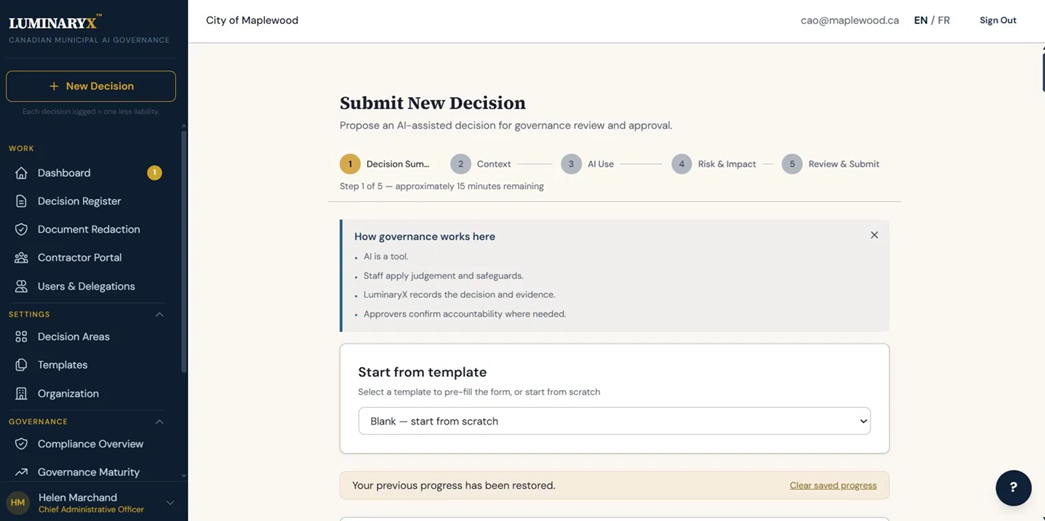
Read the transcript
LUMINARYX™ is a governance, risk and compliance record for AI use decisions. Your policies and the law, built into how each decision gets made. And there's no AI in it, because you can't govern AI with AI.
Here's one AI decision, start to finish.
This is the City of Maplewood. It's made up, all of it. Helen is the CAO. When she signs in, she sees what's waiting on her and how far setup has got.
Every AI use the city has logged sits in one register, whether it's a draft, waiting for approval, active or rejected.
Kevin works on the staff side. He wants Microsoft Copilot to draft first replies to resident emails about recreation programs, about four hundred a month. He describes it in plain language: what's being decided, how much the AI will influence it, and who it affects. He doesn't need to know the legislation. Before he submits, he can see which requirements apply. That's guidance. It doesn't stop him logging the decision.
Nadia is a manager. A different decision is waiting in her queue, a vendor scoring tool for RFP evaluations, and it needs two approvals. She's the second. She can't just click approve, she has to say why. Here she notes that the scores stay advisory, evaluators make the final call, and vendors are told AI is part of it. Whoever logs a decision can't approve it themselves.
Approval isn't the end. Before an AI tool goes live, the owner attaches what it actually produced and sends it to a reviewer. Here it's a resume screening tool, and Priya checks its output. If she has a concern, it goes back to the owner to fix and send again. If it comes back a second time, the CAO decides.
This one is already live, the chatbot answering routine questions on the city website. The record shows who owns it, who approved it and when, and why, in their own words. Further down it's honest about what's missing. LUMINARYX flags that. It doesn't hide it, and it doesn't block the work.
Everything you've just watched is in the audit trail. Each entry is chained to the one before it, so if anyone changes a record after the fact, it shows up when the chain is verified.
When council or an auditor asks how the city is using AI, Helen picks the sections and decisions she wants and downloads a board pack as a PDF.
Contractors and vendors declare their own AI use, and staff review it here.
The city's AI policies live here too, and they're versioned, so you can see what the rule was at the time.
Before someone pastes a complaint into an AI tool, they can strip out names, addresses, phone numbers and email first, in the browser, before anything is saved.
The interface switches to French with one click.
If you'd like to see it with your own team, sign up for early access at luminaryx.ca.
Features
Built and included in every price band, in English and French.
Decisions and approvals
- A numbered register of every staff use of AI
- 29 decision templates
- Risk rating: Low, Medium, High or Critical
- Approvals set by risk; nobody approves their own decision
- Critical decisions escalated, not approved
- Repeat runs: only the new output is reviewed, with no new approval
- One or two human reviews of the AI output
- Email notices to the owner, approvers and reviewers
Your policies and Canadian law
- Your own AI policy, plus three default policies to start from
- Each decision assessed against the policies that apply to it
- Requirements that apply in your province, from 64: 61 from nine laws, directives and standards, 3 from a municipal baseline
- Risk heat maps and a governance maturity score
Contractors and consultants
- A portal where outside firms declare their AI use
- 7 declaration templates
- Contractors see only the areas you assign
Records, reports and council
- A tamper-evident audit trail, hash-chained and verifiable
- A PDF record per decision and a board pack for council
- Evidence files fingerprinted with SHA-256; every download logged
- Retention periods recorded for each category of record
Privacy and security
- A privacy cleaner that removes personal information from text in the browser. Attached files are uploaded as they are.
- Two-step sign-in, lockout after repeated failed tries (five by default), sign-out after 30 minutes without activity
- Six roles: CAO, department head, manager, staff, contractor, IT administrator
- No AI inside: rules-based, no model, no data sent to one
- Hosted in AWS ca-central-1 (Montreal), with daily backups and point-in-time recovery
THAT the Chief Administrative Officer add the municipality to the LUMINARYX™ early-access list.
Add my municipality